

How to Write a Call for Papers That Gets Real Submissions
You open last year’s CFP document, replace the dates, change the conference name, and send it. Two weeks later, your inbox fills with papers that have nothing to do with your conference theme — and the authors who should be submitting have not opened the link.
This is the standard CFP experience for most program chairs. Six weeks before the submission deadline, the inbox fills with the same three questions: “What format do you want?” “Can I submit a poster instead of a full paper?” “Do these topics count?” Each one needs a manual reply because the CFP document never answered them. Meanwhile, two of your four confirmed reviewers email you to say they misread the timeline and are now unavailable during the review window.
Most CFPs are written as announcements. The effective ones are written as filters. The difference shows up in submission quality — not just volume.
By the end of this guide, you will have a repeatable structure for writing a call for papers that reduces off-topic submissions, cuts author support emails, and produces a submission pool your reviewers can actually handle.
Here is the shift that changes everything: the CFP is not an invitation — it is a specification. When you write it as one, you do the filtering before the submit button gets clicked.
This article covers how to write the CFP document itself: structure, language, section design, submission instructions, and revision handling. For the full operational lifecycle (system setup, reviewer assignment, deadline management, and promotion), see our companion guide on managing the CFP process.
What a Call for Papers Actually Does (It’s Not Just an Announcement)
Conference organizers who treat the CFP as a broadcast document get high volume and low match. Those who treat it as a specification document get fewer but higher-fit submissions — because the specification does the weeding before the author hits submit.
A typical mid-size conference receives 150-400 submissions. If 30% are off-topic — papers that do not match the conference scope, wrong format, wrong discipline — that is 45 to 120 papers a reviewer panel must desk-reject. Those rejections consume committee hours that should have gone to evaluating qualified work. Worse, each desk-rejected paper leaves an author with a negative experience, and authors talk.
A well-written CFP reduces three organizer costs simultaneously:
- Support email volume. When the CFP answers format questions before they get asked, the inbox quiets down. Program chairs report that a clear submission instructions section cuts author support emails roughly in half during the CFP window.
- Desk-reject load. Explicit topic boundaries and evaluation criteria let authors self-assess. The papers that arrive are closer to what the committee actually wants to review.
- Reviewer frustration. Reviewers assigned to clearly-out-of-scope papers lose motivation. A filtered submission pool — where every paper at least belongs — keeps reviewer engagement higher and declines lower.
The shift from “announcement” to “specification” changes every section you write. You stop describing what the event is and start defining what belongs in it.
The Core Components Every CFP Needs
If you look at the CFP pages of established CS conferences — NeurIPS, ACL, CHI, ICML — they share an identical core structure: scope → topics → submission types → format requirements → important dates → contact. The CFPs that underperform are missing one or more of these sections, or they present them in an order that forces authors to hunt.
Here are the six mandatory sections, in the order authors actually use them:
- Conference scope and theme (2-3 paragraphs). What kind of work does this conference exist to showcase? Be specific enough that a researcher in an adjacent discipline can tell if they belong. Example: “We welcome empirical studies, system papers, and theoretical contributions in natural language processing” is better than “We welcome contributions in AI.”
- Topic list (8-15 specific sub-topics). This is not a taxonomy — it is a routing mechanism. Each topic should be a phrase a researcher would use to describe their own work. More on this in Section 4.
- Submission types and their requirements. Define each category — full paper, short paper, poster, workshop proposal — with distinct page limits, expected contribution level, and review process for each. An author deciding between a full paper and a poster should not have to guess what each one entails.
- Format requirements. File types accepted, page limits, template/formatting style (IEEE, APA, ACM, etc.), and any conference-specific formatting rules. This section must come before the submission link — authors read top to bottom and will click the submit button before reading the format section if the link comes first.
- Key dates in one consolidated block. Submission deadline, notification date, camera-ready deadline, and conference dates — all visible in one place. Do not spread them across multiple paragraphs. Authors scan for dates first.
- Contact information. One email address clearly labeled as the CFP contact. Do not make authors hunt through a footer or an “About” page.
Optional but high-value additions:
- Evaluation criteria (4-5 bullet points). Tell authors what reviewers will score: originality, methodology, clarity, relevance, reproducibility. This lets authors self-reject papers they know will not score well.
- Ethics and disclosure policy. If your conference requires IRB approval statements, conflict-of-interest declarations, or AI-use disclosures, state them here.
- Presentation expectations. Will accepted papers present as talks, posters, or both? Knowing this upfront helps authors decide if the format fits their work.
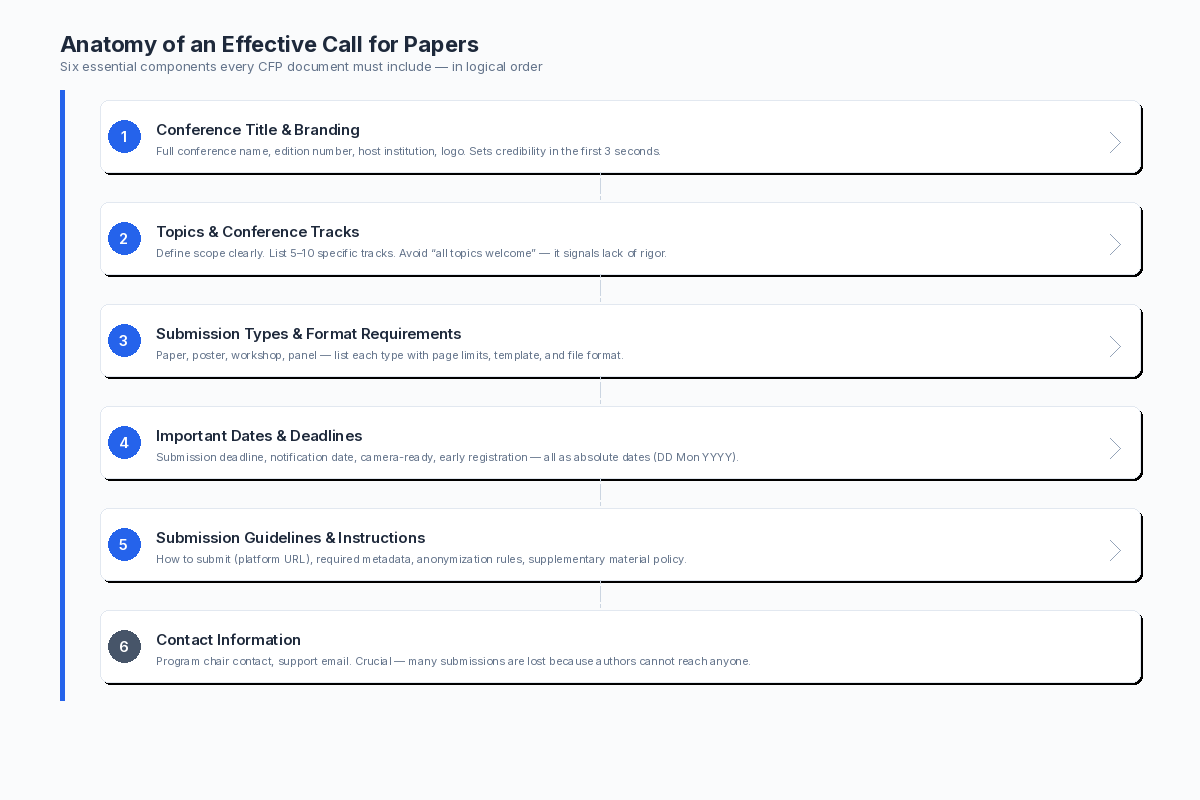
The six sections every CFP needs, in the order authors scan them.
Writing the CFP That Gets Opened (Subject Lines, First Paragraphs, and Tone)
Most CFP promotion happens through mailing lists, social media, and conference listing sites. In every channel, the author sees a subject line or a headline first — and decides in under two seconds whether to click. If the subject line is generic, the CFP does not get opened, and none of the careful writing inside matters.
Subject Lines
CFP mailing lists are noisy. A subject line that reads “[CFP] International Conference on Machine Learning 2026” blends into a feed of identical announcements. The subject lines that perform follow a formula:
Examples:
[CFP] EMNLP 2026 — Abstract Deadline: May 15 | NLP & Computational Linguistics[CFP] IEEE VIS 2026 — Submission Deadline: March 31 | Visualization & HCI[CFP] RecSys 2026 — Full Papers Due: June 1 | Recommender Systems
The deadline gives the reader a decision point (“do I have time for this?”). The topic signal gives them a relevance check (“is this my field?”). Both answers in under two seconds.
The First Paragraph
Once opened, the first paragraph must answer three questions in three sentences:
- What kind of work is welcome?
- What format should it take?
- When is it due?
Everything else — the conference’s history, the venue details, the keynote speaker list — can come later. If the author does not know within the first paragraph whether their paper fits, they either close the tab or submit anyway and hope.
Tone
Avoid “We are excited to announce.” Authors do not care if you are excited; they care if their paper belongs. Write with the confidence of a venue that knows what it wants. The tone should read like a specification, not a promotional flyer.
Do this:
The 2026 International Conference on Computational Linguistics (ICCL 2026) invites submissions of original research in all areas of computational linguistics and natural language processing. We accept long papers (8 pages) and short papers (4 pages). The submission deadline is March 15, 2026.
Not this:
We are thrilled to announce the 2026 International Conference on Computational Linguistics! This prestigious event brings together leading researchers from around the world to share groundbreaking work in the exciting field of computational linguistics. Join us for an unforgettable experience at a beautiful venue…
The first version gets submissions. The second gets scrolled past.
Structuring Topics and Tracks to Filter Submissions Before They Arrive
A CFP that lists “Artificial Intelligence” as a single topic will receive everything from NLP to robotics to philosophy of mind. A CFP that breaks it into “Natural Language Processing,” “Computer Vision,” “Reinforcement Learning,” and “AI Ethics” signals exactly which subfields are in scope — and which are not.
The topic list is the most underused filtering tool in a CFP. Here is how to make it do real work:
Make Topics Specific Enough to Exclude
Each topic should be a phrase a researcher in that subfield would use to describe their own work. If a topic is broad enough to cover three unrelated subfields, split it.
| Too Broad | Better |
|---|---|
| Artificial Intelligence | Natural Language Processing, Computer Vision, Reinforcement Learning, Knowledge Representation |
| Life Sciences | Molecular Biology, Bioinformatics, Ecology & Conservation, Neuroscience |
| Engineering | Robotics & Control Systems, Materials Engineering, Signal Processing, Energy Systems |
A researcher in robotics should see “Robotics & Control Systems” and know their paper fits. A researcher in fluid dynamics should see the list and know it does not — without emailing you to ask.
Include Explicit Out-of-Scope Notes
If your conference name could attract wrong-fit submissions, add a short exclusion note. Example:
This conference does not accept survey papers, position papers, or papers previously published in archival venues. Demo papers and workshop proposals are handled through a separate track — see the Workshops page.
This one sentence prevents a category of submissions that you would desk-reject anyway.
Design Tracks Around Your Reviewer Pool
Every track you create requires a reviewer pool with matching expertise. If you cannot name three qualified reviewers for a track, do not create it — fold it into a broader category. A track that exists on paper but has no reviewers is a liability: papers assigned to it will get shallow reviews or no reviews at all.
For organizers building their first CFP, the rule is simple: list only the topics you can actually review. A CFP with six well-covered topics outperforms one with twenty under-reviewed topics every time.
The Submission Instructions Section That Prevents 90% of Author Confusion
If you could only fix one section of your CFP, fix this one. Author support emails during CFP season cluster around five questions — and a submission instructions section that answers all five eliminates the bulk of organizer inbox traffic.
The Five Questions Every Submission Instructions Section Must Answer
1. What file formats do you accept?
State it explicitly. “We accept PDF files only. Submissions in .docx, .tex source, or any other format will be returned without review.”
2. What are the page or word limits per submission type?
List each type with its limit. Do not force authors to cross-reference a separate “Submission Types” section — repeat the limits here.
- Full papers: 8 pages + unlimited references
- Short papers: 4 pages + unlimited references
- Poster abstracts: 2 pages including references
3. What is the anonymization policy?
State whether the review is single-blind, double-blind, or open. If double-blind, give concrete anonymization instructions: remove author names from the PDF metadata, cite your own prior work in the third person, and do not include acknowledgments that reveal identity.
4. Can authors include supplementary material?
Answer: yes/no, format restrictions (PDF only, ZIP allowed, no external links), and whether reviewers are required to consult it. Most conferences make supplementary material optional for reviewers — state this explicitly so authors do not assume their appendix will be read.
5. Can authors revise and resubmit before the deadline?
Most CFPs allow multiple uploads before the deadline — state it. “You may update your submission as many times as you like before the deadline. Only the most recent version will be reviewed.” Without this line, authors assume their first upload is final and email you to ask.
Format Instructions as Scannable, Not Readable
Authors do not read submission instructions — they scan them. Use bullet lists, not paragraphs. Put each requirement on its own line. Label each section with a bold header so an author looking for “file format” finds it in under a second.
Before You Submit — Quick Checklist:
- [ ] File is a PDF
- [ ] Within page limit for your submission type
- [ ] Author names removed from PDF and metadata (if double-blind)
- [ ] Supplementary material attached (if applicable)
- [ ] All co-authors confirmed and listed
Put this checklist block directly above the submission link. It catches errors at the last possible moment — right before the author clicks submit.
Where Most CFPs Lose Authors (and How to Fix It)
Three failure patterns repeat across underperforming CFPs. Each is fixable with a small, targeted change. You do not need to rewrite your entire CFP to fix the one thing that is breaking it.
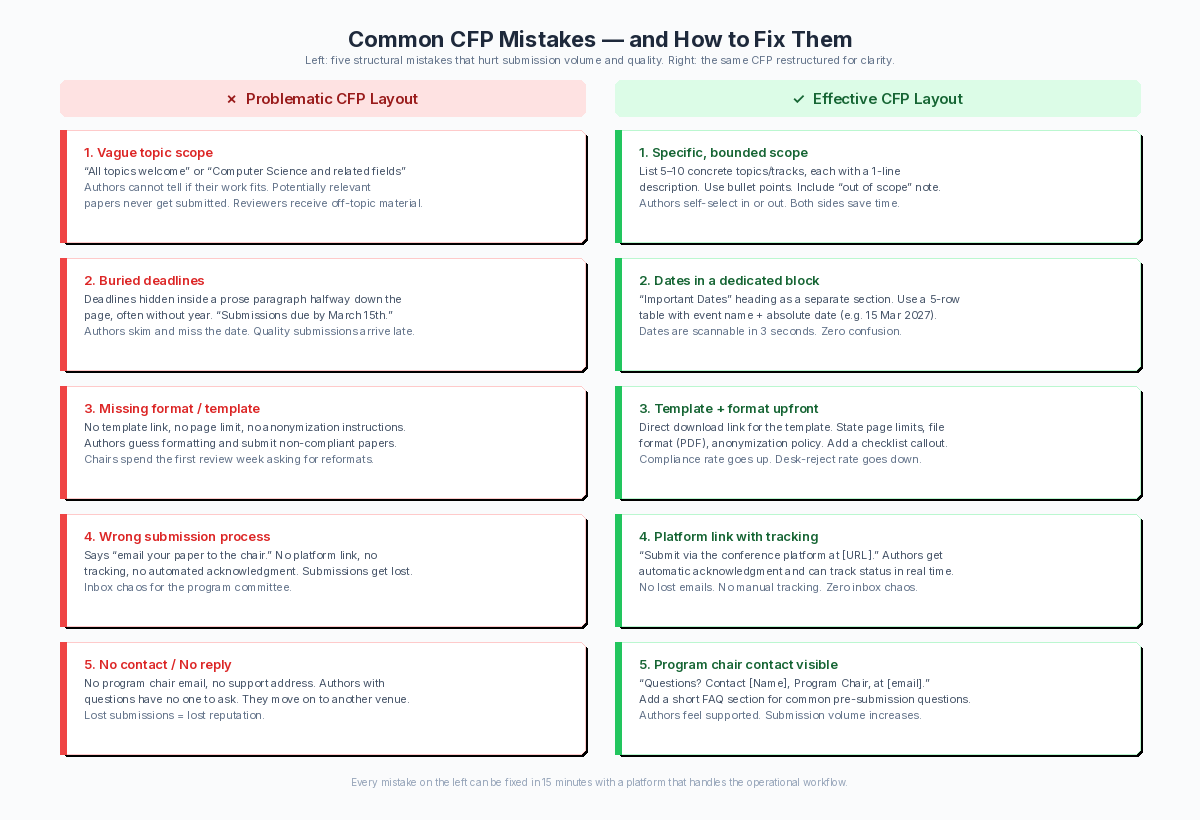
Same CFP information, two layouts. The version on the right answers author questions before they ask.
Pattern 1: No Evaluation Criteria
Authors do not know what reviewers want, so they submit and hope. The result: papers arrive that are well-written but miss the mark on methodology, originality, or relevance — things a clear scoring rubric would have surfaced.
Fix: Add 4-5 evaluation criteria as bullet points. Example:
Submissions will be evaluated on: – Originality and novelty of the contribution – Soundness of the methodology or argument – Clarity of presentation and writing quality – Relevance to the conference themes and audience – Reproducibility (where applicable: code, data, or detailed methods provided)
This lets an author whose paper is a literature survey — but your conference prioritizes empirical work — self-reject before submitting.
Pattern 2: Vague or Single-Word Topic List
“We welcome all topics in computer science.” This is not a topic list — it is an abdication. Authors in computer architecture, theory, systems, AI, and HCI all think their work counts. Half of them are wrong for your conference, but the CFP gave them no way to know.
Fix: Replace with 8-15 specific sub-topics. Each one should sound like something a researcher types into Google Scholar. If you cannot name 8 sub-topics for your conference, your scope may be too broad or too vague. Fix the scope before you write the CFP.
Pattern 3: Submission Link Buried in Prose
“The submission system is now open and you may upload your paper through the conference management platform by navigating to the author dashboard and selecting…”
Fix: Give the submission link its own H3 header labeled “Submit Here” and make it the most visually prominent element on the page. Authors who have decided to submit should not need to read a paragraph to find the button.
Pattern 4: No Word on What Happens After Submission
The author submits. Then silence — for weeks, sometimes months. The CFP says nothing about when they will hear back, what the review process looks like, or what is expected of them next.
Fix: Add one paragraph after the submission instructions:
After submission, all papers undergo an initial format and scope check by the program chairs. Papers that pass are assigned to 2-3 reviewers for double-blind evaluation. You will receive a decision and reviewer feedback by [Notification Date]. Accepted authors must submit camera-ready versions by [Camera-Ready Deadline] and register for the conference by [Registration Deadline].
This paragraph replaces roughly eight FAQ emails per author.
Pattern 5: The Wall of Text
The CFP is a single continuous block of prose with no headings, no bold, no lists, no visual hierarchy. Authors must read every word to find the one piece of information they need — the deadline, the page limit, the submission link. Most will not.
Fix: Add bold section headers. Put key dates in a table or a visually distinct block. Use bullet lists for requirements. The goal is that an author scanning the page for 10 seconds can locate: the deadline, the page limit, the format requirements, and the submit button. If they cannot, the layout has failed, even if the writing is good.
For the post-submission operational workflow — reviewer assignment, system configuration, deadline tracking — see our guide to managing the CFP process for the full pipeline.
How to Handle Revisions and Extensions Without Confusion
Even a well-written CFP sometimes needs changes. A deadline shifts. A topic is added. A broken link needs fixing. How you communicate these changes determines whether authors trust the process or assume something is wrong.
Deadline Extensions
When a deadline extension is announced as “We have extended the deadline to March 30” with no explanation, authors assume low submission numbers. When it is framed as “Due to multiple requests and a scheduled system maintenance on the original date, the deadline is now March 30,” authors treat it as a logistical adjustment.
Always include a reason. Acceptable reasons include: author requests, schedule conflicts with a major holiday or overlapping conference, system issues, or committee availability. If the real reason is low submissions, say “to ensure a broad and representative submission pool” — it is truthful without signaling desperation.
Scope and Topic Changes
Never silently edit a live CFP page. If you add a topic, announce it. If you remove one, explain why. A researcher who starts writing for a topic that disappears mid-cycle has wasted their time, and they will remember which conference did it to them.
If the change is minor (one topic added, wording clarified), a single update post or email thread suffices. If it is significant (a whole track added, submission categories changed), treat it as an amendment — post it separately with a clear “Update” label and the date.
Correction Notices
Typos in dates, broken submission links, wrong email addresses — these are common and fixable. The rule: consolidate corrections into one update, not a stream of individual messages. Sending three correction emails in one week erodes confidence faster than the original errors did.
If you are using a conference management platform that tracks CFP revisions — in Leconfe, the CFP page, submission form settings, and automated email templates share the same configuration — a single update propagates everywhere. The date on the public CFP page changes; the submission form deadline updates; the reminder emails reflect the new timeline. No manual sync required.
Why Most CFP Tools Make Writing Harder Than It Should Be
Here is how most CFP workflows actually work: you write the CFP text in Google Docs. You configure the submission form in a separate platform — EasyChair, OpenConf, or a university-hosted system. You mail the announcement from your institutional email. Three separate tools, three separate configurations, no synchronization between them.
The result: version drift. When a deadline changes, you update the Google Doc. Then you remember to update the submission form — or you do not, and authors see two different dates. When a topic is added, you add it to the CFP document. Then someone must add it to the submission form’s topic selector. If they forget, the topic exists on the CFP page but authors cannot select it when they submit. This is not rare — it is the default state of a multi-tool workflow.
The CFP document and the submission form are not two separate artifacts. They are two views of the same specification. When they live in different tools, the spec fragments. Authors see one version in the CFP text and another in the dropdown menu on the submission page. The inconsistency is what generates confusion and support emails.
In Leconfe, the CFP document and submission form are driven by the same configuration. You define topics, submission types, deadlines, and format requirements once — and they appear on the public CFP page, in the author submission form, and in the automated email notifications. When you update a deadline, the CFP page, the form, and the reminder emails all reflect it. There is no second system to remember, no manual sync step to forget.
This is not a convenience argument — it is an accuracy argument. The most common CFP error is a mismatch between what the announcement says and what the submission form accepts. A unified system eliminates the mismatch by design.
Write your next CFP in a platform where the document and the submission form stay in sync → Get Started Free
CFP Checklist: What Your Draft Should Cover Before You Send It
Before you publish your call for papers, run it against this list. Organizers who do a pre-send checklist catch an average of 3-4 errors or missing sections before launch. The most common missed items: no evaluation criteria, no anonymization policy, and a submission link buried in body text.
Pre-Send Scan
- [ ] Conference scope stated in the first 3 paragraphs — specific enough to exclude adjacent disciplines
- [ ] Topic list contains 8-15 specific sub-topics, not a single generic phrase
- [ ] Submission types clearly defined (full paper, short paper, poster, etc.) with distinct requirements for each
- [ ] Format requirements listed before the submission link
- [ ] Accepted file formats explicitly stated
- [ ] Page or word limits stated per submission type
- [ ] Anonymization policy stated (single-blind, double-blind, or open review)
- [ ] Evaluation criteria listed — 4-5 items reviewers will score
- [ ] Key dates in one consolidated block (submission, notification, camera-ready, conference)
- [ ] Submission link labeled clearly and placed prominently — not buried in a paragraph
- [ ] Contact email visible — not hidden in a footer or an “About” page
- [ ] Supplementary material policy stated (allowed/disallowed, format restrictions)
- [ ] What happens after submission explained — review timeline, notification, and next steps for accepted authors
After You Send It
Monitor your inbox for the first 48 hours. The questions authors ask reveal what your CFP missed. If three people ask about page limits, your page limit section is not prominent enough. If five people ask whether their topic fits, your topic list is too vague. Patch the CFP immediately — most platforms let you edit a live CFP, and a fix on day two prevents fifty more emails over the next two weeks.
FAQ
What is the difference between a CFP and a conference announcement?
A conference announcement tells people the event exists. A CFP tells authors exactly what to submit, in what format, by what deadline, and what happens next. Confusing the two is the most common reason CFPs underperform. If your document would work as a flyer pinned to a department bulletin board, it is an announcement, not a CFP.
Should I list program committee members’ names in the CFP?
Yes. Listing the program committee — with names and affiliations, not biographies — signals the review standard and attracts authors who want their work evaluated by peers they respect. It also gives potential reviewers a reason to accept your invitation when they see colleagues they know on the list. Keep the list to names and institutions. A committee of 30 people with 200-word bios each adds thousands of words authors will scroll past.
Writing a call for papers that gets real submissions is not about being the loudest announcement in the mailing list. It is about being the clearest specification — defining scope, topics, formats, and expectations so precisely that authors self-select and off-topic submissions drop before they start.
Take your current CFP draft and run it against the checklist above. Fix the three weakest items. Then send it. The difference between “we received 200 submissions and half were off-topic” and “we received 120 submissions and the review panel handled all of them” starts with what you put on the page.
Draft your next CFP in a platform where the document and the submission form share the same configuration — no manual sync, no version drift → Get Started Free
For the full operational lifecycle — system setup, reviewer assignment, promotion, and post-submission workflow — read our companion guide: How to Manage Call for Papers: A Comprehensive Guide for Organizers.