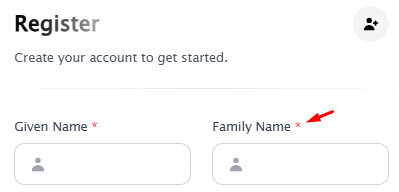
Making the Family Name field required ensures you collect complete author information for your conference proceedings. It helps with consistent data grouping, sorting, and searching of authors. In Leconfe, the Family Name field is optional by default. This guide shows you how to make it required.
Note:
This step requires some core file modifications on Leconfe. Experienced personnel are required to complete this step. Before proceeding, make sure you have backed up your Leconfe. By doing this step, make sure you repeat the same steps when you need to upgrade your Leconfe version.
Here is how to do it:
For Leconfe v1.4.1 and newer: Go to your scheduled conference Website → Setup page and check the “Require Family Name” option. This is the recommended way and does not require any code changes.
For older Leconfe versions (before v1.4.1): Follow the manual steps below.
1. Find and open this file on your Leconfe installation:
/app/Frontend/ScheduledConference/Pages/Register.php
2. Find the function named as: 'family_name' On those function
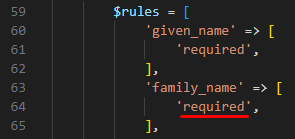
3. Then in the family_name code, please change 'nullable' to 'required' as in the image above.
Default Theme
1. Find and open this file on your Leconfe installation:
/resources/views/frontend/website/pages/register.blade.php
2. Find the function named as: 'general.family_name' On those function
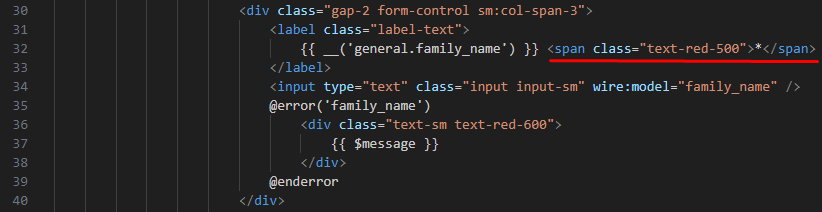
Then add this script: <span class="text-red-500">*</span> as image above
3. Save, and please check this change on the registration form.

The changes described in the steps above only apply to the default theme. If you are using a different theme, you will need to make additional adjustments specific to that theme.
Tempest Theme
If you are using our template either Tempest theme you can find the registration Form file here :
/plugins/Tempest/resources/views/frontend/website/pages/register.blade.php

Then add this script: <span class="text-red-500">*</span> as image above
Result: